-
Procedural Spider Locomotion Epic’s Locomotor extended with custom foot placement and physics.
Uneven Terrain
I built the spider’s gait on Epic’s Locomotor, with runtime stepping and foot placement that adapts to uneven terrain.
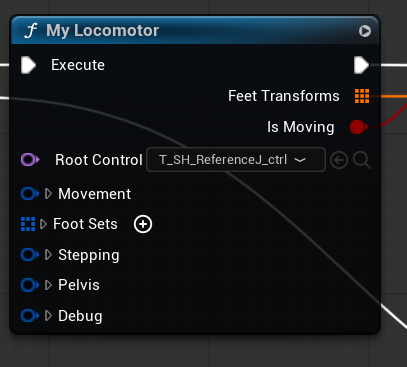
Locomotor provides foot targets; Full Body IK solves the leg poses. Any Orientation
Epic’s probes assumed world Z. I fixed them to follow the rig’s orientation, including full 180° inversions.
Offsetsets the ground probe’s direction and reach.LocomotorCore.cppBefore const FVector Offset = FVector(0, 0, MaxHeight);After const FVector LocalUp = Foot.ReferenceWorld .GetRotation().GetUpVector(); const FVector Offset = LocalUp * MaxHeight;Narrow Supports
I added inward sphere casts to find side contacts when Epic’s ground probes miss narrow supports.
Added inward probe FVector TowardBody = BodyLocation - RefLocation; TowardBody.Normalize(); const FVector End = RefLocation + LocalDown * InwardProbeDistanceDown + TowardBody * InwardProbeDistance;Automatic Surface Alignment
I use the combined normal of surrounding sphere probes to align the rig’s pitch and roll.
Reference tilt · pseudocode P = MAIN.position normalSum = (0, 0, 0) for d in grid3D(0, ±0.5, ±1) except zero: hit = sphereCast(P, P + unit(d) * 500, 50) if hit: normalSum += hit.normal PlantNormal = unit(normalSum) axis = unit(cross((0, 0, 1), PlantNormal)) angle = acos(dot((0, 0, 1), PlantNormal)) tilt = axisAngle(axis, angle) reference.rotation = tilt * MAIN.rotationPhysical Response
I integrated Control Rig Physics after Locomotor and Full Body IK. Spring-damped bodies add inertia and world-collision response, while kinematic anchors preserve procedural control.
-
MetaHuman Crowds & Traffic UE 5.8 crowds with ASTP, Nanite and Instanced Skeletal Meshes.
MetaHuman Crowds On UE 5.8
I built ScansFactoryMass for Scans Factory on Unreal’s Mass ECS (Entity Component System) and MetaHuman Crowd systems. My C++ processors batch locomotion updates over contiguous fragment data for CPU cache locality.
I extended Epic’s animation processor with per-entity walk modes. A movement-style catalog assigns each MetaHuman its own walk animation.
MetaHuman Collection & Wardrobe
I built C++ and Python tools for the MetaHuman Collection pipeline. We used my Convert to Wardrobe tool to reuse outfits from Epic’s Matrix Sample, turning their meshes into cloth assets and wardrobe outfit assets.
Body-specific outfit assets and generated hidden-face maps keep clothing compatible with its target body.

Generated outfit assets from Matrix Sample clothing. ASTP & Body Correctives
I use Animation Sequence Transform Providers (ASTP) to animate Instanced Skeletal Meshes with Nanite rendering, reducing CPU animation work and keeping geometry LOD transitions seamless.
My bake evaluates animations on the target body through its post-process AnimBP, baking its DNA-driven body correctives into the ASTP data. This frees animation authoring from Epic’s default single-skeletal-mesh requirement.
Designer-Authored Idle Behavior
I used MetaHuman Animator to create all the plugin’s idle animations from video.
My idle anchors let designers place, orient and preview characters, then choose a named animation. My spawn generator transfers each anchor’s transform and animation index to Mass entities.
MetaHuman Animator: video-to-animation authoring. Pedestrians & Traffic In Paris
I extended ZoneGraph and StateTree behavior with signal-aware path selection, vehicle queues and crossing occupancy shared by cars and pedestrians.
Here the plugin runs in a detailed Scans Factory environment, with pedestrians using crossings alongside moving traffic.
-
Dialogue System Chernobylite 2: MetaHuman emotions, audio-driven lip sync, and head/eye tracking.
Procedural Facial Emotions
I created the MetaHuman dialogue system for Chernobylite 2. Facial emotion loops recorded with an iPhone play as an ambient layer, with expressions selected procedurally from each dialogue line.
Audio-Driven Lip Sync
I integrated audio-driven facial animation with the MetaHuman rig. Voice recordings drive the lip sync, while the dialogue system combines it with the ambient facial emotions.
Head And Eye Tracking
I added procedural head and eye tracking so characters keep their attention on the player or the current dialogue partner. Small gaze shifts help the look feel natural as the target moves.
Every Dialogue In Chernobylite 2
I combined iPhone-recorded emotions, audio-driven lip sync, and head/eye tracking to power every dialogue in Chernobylite 2.

-
Motionmatching Locomotion Chernobylite 2: Unreal motion matching with procedural weapon posing.
Main Hero Locomotion
I integrated Unreal Engine’s motion matching for the main hero in Chernobylite 2. The same unarmed locomotion set drives running, turns and crouching, with weapon poses layered over the movement.
Procedural Weapon Posing
I author one holding pose per weapon and reuse unarmed locomotion. The Animation Blueprint converts whole-character movement into an additive relative to neutral idle, then applies it over the weapon pose.
Per-weapon data sets additive alphas for each clavicle, upper arm and forearm. The arms carry the hands procedurally while preserving the authored grip.

Animation Blueprint flow, simplified. -
Custom Gameplay Ability System Chernobylite 2: custom abilities, motion correction and enemy attacks.
Custom Ability System
I wrote my own gameplay ability system for Chernobylite 2 to avoid the boilerplate of Epic’s GAS by making the whole system DataTable-driven. It handles ability activation, resource checks, cooldowns, input and replication, with attacks authored as Blueprint ability actors.
Rotation Around A Planted Foot
A notify selects a planted foot as the pivot. I rotate the actor around it to correct baked 45°, 90° or 135° root-motion turns that rotate too far or not far enough.

MotionFix Root Correction
I built MotionFix, my own root-motion correction system. Notify states in animation montages control when an enemy turns, tracks a target or adjusts its movement, letting me tune each attack without rebaking the animation.

The montage notify state defines when MotionFix is active. Hundreds Of Enemy Attacks
I designed, oversaw and implemented hundreds of enemy attacks for Chernobylite 2. This collection shows the range of attacks built on the same custom ability framework, from regular enemies to bosses.
-
OpenGL Locomotion & Animation Graph Built from scratch in C++: real-time rendering and a full skeletal animation pipeline.
Rendering From Scratch
I built animFlex in C++, writing the OpenGL renderer and locomotion system from scratch, without a game engine or animation plugins. The renderer uses dual-quaternion skinning.
Emscripten compiles the C++ code to WebAssembly, so the same project runs in the browser with WebGL.
Live Animation Graph
I adapted Rete.js to build the node editor and connected it to my C++ animation runtime. Nodes, connections and parameters update the running graph immediately, without a graph compilation step.
Custom CCD IK
I implemented cyclic coordinate descent IK in C++, with knee hinge limits and smooth blending into the animated pose. Changing the target moves the foot in real time; the inset shows the CCD IK node driving the solve.
-
Mocap Planning & Direction I plan every mocap session, often perform myself, and direct professional actors.
Performing & Directing
I often perform as an actor myself and direct professional actors on set. I use physical demonstrations and practical feedback to guide their movement and timing.
From Design to AnimBP
I plan every mocap session from game design through recording. I split the takes into animation files structured for their intended use in Animation Blueprints, which I then set up myself.
-
Physics-Driven Death Reactions Epic’s Physics Control integrated with directional stumbles, gore, and ragdolls.
Physics Control Integration
I integrated Epic’s Physics Control with the death animations. Kinematic feet preserve the stepping motion, while spring-damped controls give the body a physical response.
Directional Stumbling
I select the stumble animation from the hit direction, then blend it into the physical collapse.

My death-reaction state machine. Leg loss skips Stumbling. Gore System Support
I integrated the reactions with Chernobylite 2’s gore system. Dismemberment changes the state transitions and timing, including a faster collapse after head loss.
Ground Interaction
I use animation poses as targets for the simulated body. Physics Control drives the limbs toward those poses, while collisions with the floor shape the final movement.
-
Procedural FPS Shooting Chernobylite 2: procedural ADS and recoil, driven by per-weapon DataTables.
Procedural Aiming & Recoil
I built Chernobylite 2’s procedural first-person aiming and recoil. Sight sockets and arm IK control the aiming pose at runtime; motion curves drive weapon kickback with per-shot variation, while camera kick is interpolated.
DataTable-Driven Weapons
I expose weapon setup through DataTables: hip-fire and ADS offsets, recoil, spread, fire mode and projectile properties.

Per-weapon setup feeds the shared runtime system. -
Procedural Hit Reactions Additive reactions from hit location and direction across different skeletons.
Hit Location And Direction
I built these hit reactions entirely in Control Rig, with zero baked hit-reaction animation. The rig calculates additive rotations from hit location and direction. The struck area responds most strongly, with rotation falling off along the skeletal hierarchy.
One Control Rig, Multiple Skeletons
I reused one Control Rig across humanoid and creature skeletons. It imports each character’s skeleton and calculates reactions from its hierarchy, so the same hit-reaction logic works across different body shapes.
Hit Accumulation And Recovery
I collect each shot’s location and direction in an array, with a 0.15-second lifetime. Each animation update counts down the lifetimes and rebuilds the array from unexpired hits. The Control Rig combines their additive rotations, and damped springs produce overlapping shakes that settle back to the base pose.
-
Procedural Boss Animation Believable boss-fight motion with minimal baked animation.
Secondary Motion
I combined Unreal’s Physical Animation with world-space spring interpolation of bone positions and rotations. Sinusoidal time functions generate bone targets for the cape and feet. The cape and limbs gain believable secondary motion with no baked animation.
Whole-Character Control
I drove the whole character procedurally, using minimal baked animation for the scythe. This keeps animation authoring inexpensive while producing effective boss attacks.
-
Bird AI & Locomotion Custom C++ bird behavior and movement in Unreal, built on StateTree and Mover.
Player-Aware Behavior
I built birds that wander, move away and take flight as player threat builds. The bird actors have no collision and use no NavMesh.
I use StateTrees purely to select intentions; the behavior itself lives in my C++ Mover states.
Flock Optimization
I use shared 10 Hz awareness sampling and a spatial grid for neighbor searches. Distant, offscreen birds suspend movement and StateTree ticks, while animation uses lower update rates at distant LODs and pose interpolation nearby.
Takeoff & Landing
I treat the motion curves like baked root motion, storing velocities over time instead of position offsets.
For landing, I integrate those velocities to calculate the displacement, then work backward from the landing target to find the starting position for clearance queries. This keeps in-place animation on worker threads in sync with actor movement on the game thread.
Designer-Authored Routes
I support both free roaming and spline-guided walking and flight. Designers can shape routes in the level and choose each bird’s ground and flight modes independently.
Obstacle-Aware Flight
I use predictive steering, world sweeps and separation between nearby birds to navigate obstacles. These are spatial queries; the bird actors need no collision components.
-
Humanoid Rigging Maya humanoid rigging, from controls to Unreal deformation.
Rig In Motion
I develop humanoid rigs for animation and real-time use, with animator controls, skinning and deformation helpers. Motion tests and extreme poses guide how I refine shoulders, elbows and hips.
IK/FK Controls
My rigging workflow combines IK/FK limb controls, pole vectors and individual finger controls. I give animators direct hand placement in IK and joint-by-joint posing in FK.
Helper Bones And Quaternion Math
I use corrective and roll bones to preserve joint volume and distribute twist. My custom Maya Python nodes separate quaternion rotation into twist and swing to drive those helpers.
Quaternion twist avoids Euler gimbal lock and −180°/+180° flips in helper-bone drivers. RBF Pose-Space Deformation
I author RBF (radial basis function) corrections in Epic’s Pose Wrangler, sampling joint rotations and shaping the driven helper bones. The solvers interpolate between those poses to support deformation throughout the joint’s range.
Pose Wrangler · Authored poses, driver joint and corrective bones. Unreal Post-Process AnimBP
I carry Maya-authored RBF corrections into Unreal as Pose Driver nodes in a post-process Animation Blueprint. They evaluate after the main animation pose, keeping deformation corrections reusable across animations.
I validate the result with corrections enabled and disabled, then stress-test shoulder and hip rotation.
Pose Driver · LeftArm RBF correction in the Animation Blueprint. -
First-Person Keyframe Animations Weapons & cinematics in Chernobylite 1.
Weapon Animation
I hand-animated most of the first-person weapon animations in Chernobylite 1, including locomotion, aiming down sights (ADS), melee attacks and reloads.
Short Cinematics
I also hand-animated most of the short cinematics in Chernobylite 1. They play during random events across all levels.
-
Replicated Drone Flight Mover + Enhanced Input drone steering.
Angle And Acro Flight
I built Angle and Acro steering for Rescue Drone Simulator: Second Chance, using Unreal’s Mover. Angle automatically levels the drone; Acro integrates local-axis rotations as quaternions.
Crafting Changes Flight
I made crafting designer-friendly with DataTable-driven component definitions, compatibility rules, and stat modifiers. Designers can balance parts without changing code; the assembled drone’s stats feed flight tuning, from thrust and speed to braking and tilt response.
My Enhanced Input Plugin
I built a custom plugin around Enhanced Input, using gameplay-tagged actions and stacked control states to share input handling across drones, characters, and UI.
Input travels from the top layer down until a layer handles it. For example, a tutorial overlay can consume confirm and dismiss keys while steering still reaches the flight layer below. This lets UI take only the controls it needs while gameplay continues underneath.